Digital Marketing Blog

How to Leave a Google Review

by | Aug 1, 2025

UPDATED AUGUST, 2025

As I’m sure you know, Google reviews are a very important part of any business’s digital marketing plan. Consumers rely on those reviews as a basis for determining the trustworthiness and expected experience with a given business or product. Study after study has shown that almost 90% of consumers believe what they read in review platforms and base their buying decision on the experiences and opinions shared by others.

That’s not the only important aspect of online reviews. They also impact the search engine optimization (SEO) of your website. Google uses those reviews as a factor in determining how trustworthy and well-liked your business is. The more positive review posted for your business, the better!

Getting Google reviews can be challenging

There are two challenges in obtaining Google reviews. The first is making sure you ASK clients to do it! You see, even a very happy customer doesn’t run out and leave you a great review just because you’re awesome.Typically, they paid for a product or service and even if you exceeded their expectations, in their minds it was a fair trade.However, if you ask them for a review while they are feeling elated with their experience they are far more likely to want to help you out.This is where the second challenge comes in – making sure your clients know how to leave a review on Google. You need to make it as easy as possible for them to leave that review just in case online technology isn’t their forte.

Step-by-step instructions on how to leave a Google review

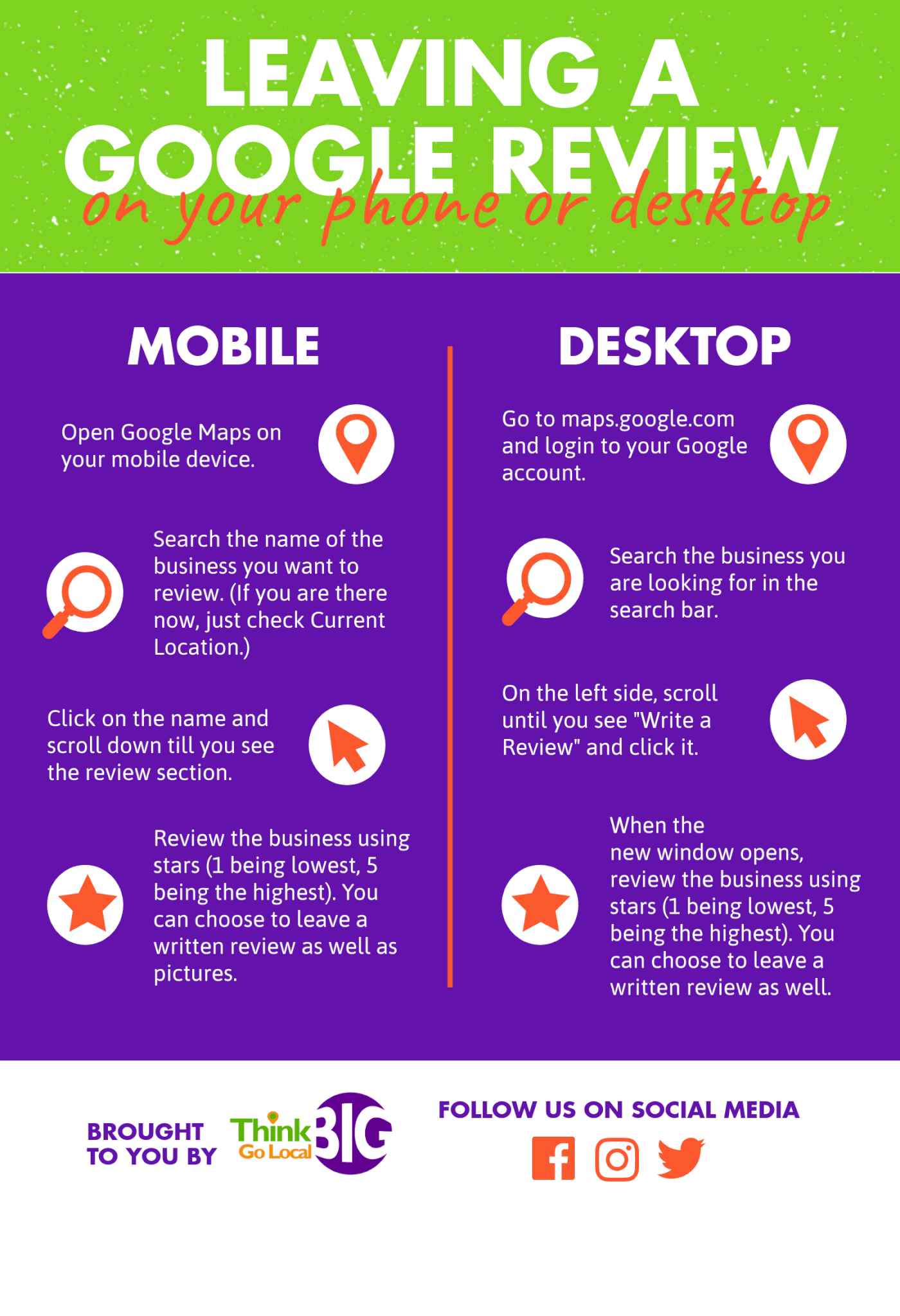
We want you to succeed and to accumulate as many positive reviews as possible, so we’ve put together these step-by-step instructions. I encourage you to copy and save the infographic to share it with your customers when you ask for reviews. I promise, the easier you make it, the more reviews you’ll get. The more positive reviews you have, the higher your website will rank and the faster your business will grow!


Leaving a Google Review on a Mobile Device

  1. Open the Google Maps app on any mobile device.
  2. Type in the name of the business you want to review. If you are physically present at the business location when leaving the review, you can select “current location.”
  3. Click on the business name when it displays.
  4. Scroll down until you see the review section and select the number of stars you want to give, 1 being most negative and 5 being most positive.
  5. You will then have the option to leave a written review and upload any photos you want to share.

Leaving a Google Review on a Desktop or Laptop

  1. Go to Google Maps and make sure you are signed in to your Google account. For most people, the Google account login is the same as the one used to log into Gmail.
  2. Type the name of the business you want to review in Google Maps search bar.
  3. Select the business from the list of search results and then scroll down and click Write a Review.
  4. A new window will open, enabling you to select the number of stars you want to give, 1 being most negative and 5 being most positive.
  5. You will then have the option to leave a written review and upload any photos you want to share.


Editing or Updating a Google Review

Sometimes, after leaving a review, you might notice a typo, have a change of heart, or simply want to update your feedback based on a new experience with a business. Good news—Google makes it easy for you to go back and update any review you’ve previously shared.

Here’s how you can edit or update your Google review:

  1. Open Google Maps and log in to your Google account (the same one you used to write the original review).
  2. Click the menu icon (three horizontal lines) at the top left and select Your contributions.
  3. Choose the Reviews tab to see all the reviews you’ve left.
  4. Find the business whose review you wish to edit. Next to that review, click the three-dot menu.
  5. Select Edit review. From here, you can update your star rating, rewrite your comments, and even add new photos if you’d like.
  6. When you’re done, just click Post to save your changes.

Updating your reviews helps ensure fellow consumers get the most accurate, up-to-date information. And after all, businesses can change—so your reviews should, too!

Why Google Doesn’t Allow Anonymous or Fake Reviews

So, why is it that Google puts the brakes on anonymous or fake reviews? Well, it really comes down to trust and credibility. Google wants to ensure that every review you see comes from a real person who actually interacted with the business. When reviews are tied to verified accounts, shoppers know they’re reading honest feedback from genuine customers—not someone hiding behind a keyboard just to help (or hurt!) a business’s reputation.

Plus, by making sure only authentic experiences are shared, Google helps protect both businesses and customers from scams, spam, or misleading information. This commitment to transparency keeps reviews meaningful—and gives everyone confidence in what they’re reading.

Becoming a Local Guide: Amplify Your Local Impact

If you love sharing your experiences and want to play a bigger role in supporting local businesses, becoming a Google Local Guide is a fantastic step forward! As a Local Guide, you have the power to make your voice stand out in the crowd and help shape the way neighbors—and visitors—discover your favorite spots.

Here’s how it works: every time you leave a review, upload a photo, answer questions, or update information on Google Maps you earn points. These points not only unlock fun perks (like early access to new features and, every so often, special partner rewards), but they also let your contributions shine with a Local Guide “star” next to your name. The more you contribute, the more visible and credible your reviews become—which means your recommendations can have an even greater influence in your community!

How to Maximize Your Impact as a Local Guide:

  • Go beyond a quick comment—write a review over 200 characters to really share your insights.
  • Add photos and even videos to help people get a feel for the business.
  • Tackle questions that come up on business listings, and respond to Q&As fellow users have posted.
  • Keep your past reviews up to date, especially if a business changes.
  • If you spot a new spot in town, add it to Google Maps or update old info—every little bit helps!
  • Create lists of your favorite places or hidden gems to help others explore your area.

By sharing your authentic experiences and supporting local businesses, you don’t just earn points—you help neighbors make better choices, boost the visibility of hardworking entrepreneurs, and foster a thriving local scene. If you’re excited about making your mark, becoming a Local Guide is a creative and impactful way to get involved!

Now, get out there and start growing that positive, impactful, business-building online reputation! And, if for any crazy reason you are not already following us on Facebook, Twitter, Instagram, YouTube, or LinkedIn, let’s connect!
YouTube video
Bobbi Baehne

Bobbi Baehne

President, Think Big Go Local, Inc.

My mission at Think Big Go Local is to create a “buzz” around our client’s businesses online and in social media platforms so their message reaches their desired audience.  We know that relationships are built and maintained online each and every day and work to make sure our clients are building credibility, authority and attracting new followers and clients .  We don’t work in a cookie cutter environment, each of our clients is unique and their accounts are fully managed using their voice, talking to their specific audience and sharing value that keeps them coming back.